Street Smart X – Cross Section Tool Redesign

Role: Senior Product Designer
Increase Adoption of Cross Section Tool
Make cross-section a default, frequently used capability by simplifying interaction and improving clarity of output.
1
Accelerate Infrastructure Assessment
Enable faster, more confident evaluation of road conditions by reducing manual analysis and external dependencies.
2
Embed cross-section into repeatable DOT/GIS workflows through save, export, and reuse, driving product stickiness and value.
Strengthen Enterprise Workflow Integration
3
Business Goals

Process
02
Research & JTBD Definition
Mapped key workflows across verticals and defined jobs-to-be-done to understand how users analyze slopes, drainage, and road profiles in practice.
03
Interaction & Concept Exploration
Explored alternative interaction models and simplified the experience into a clear two-point system, reducing confusion around modes and improving predictability.
04
Prototyping & Validation
Developed interactive prototypes to test data readability, interaction clarity, and UI behavior, iterating based on internal feedback and usability testing.
05
Iteration & Optimization
Refined the solution by improving visual hierarchy, reducing UI friction, and aligning the tool with real workflows, preparing it for MVP validation and future scaling.
01
Discovery & Problem Framing
Reviewed the existing tool and gathered insights from Sales Engineers and stakeholders to identify gaps in workflows, usability, and data interpretation.
Problem

Role & Scope
As Senior Product Designer, I led the end-to-end redesign of the Cross Section tool: Defining the problem, shaping key workflows, and delivering a clear, scalable interaction model in close collaboration with product and engineering.
Outcome

The redesign reduced friction and improved clarity in key workflows. Early Amplitude data showed ~25% fewer drop-offs and ~20% fewer mis-clicks in mode selection, indicating better usability and user confidence.
Usability testing validated improved task clarity, with faster completion and fewer interaction errors.
Our research uncovered that the Cross Section tool prioritized functionality over usability. Unclear interaction modes, poor data readability, and lack of actionable outputs created friction in key workflows, preventing users from efficiently analyzing and trusting the results.
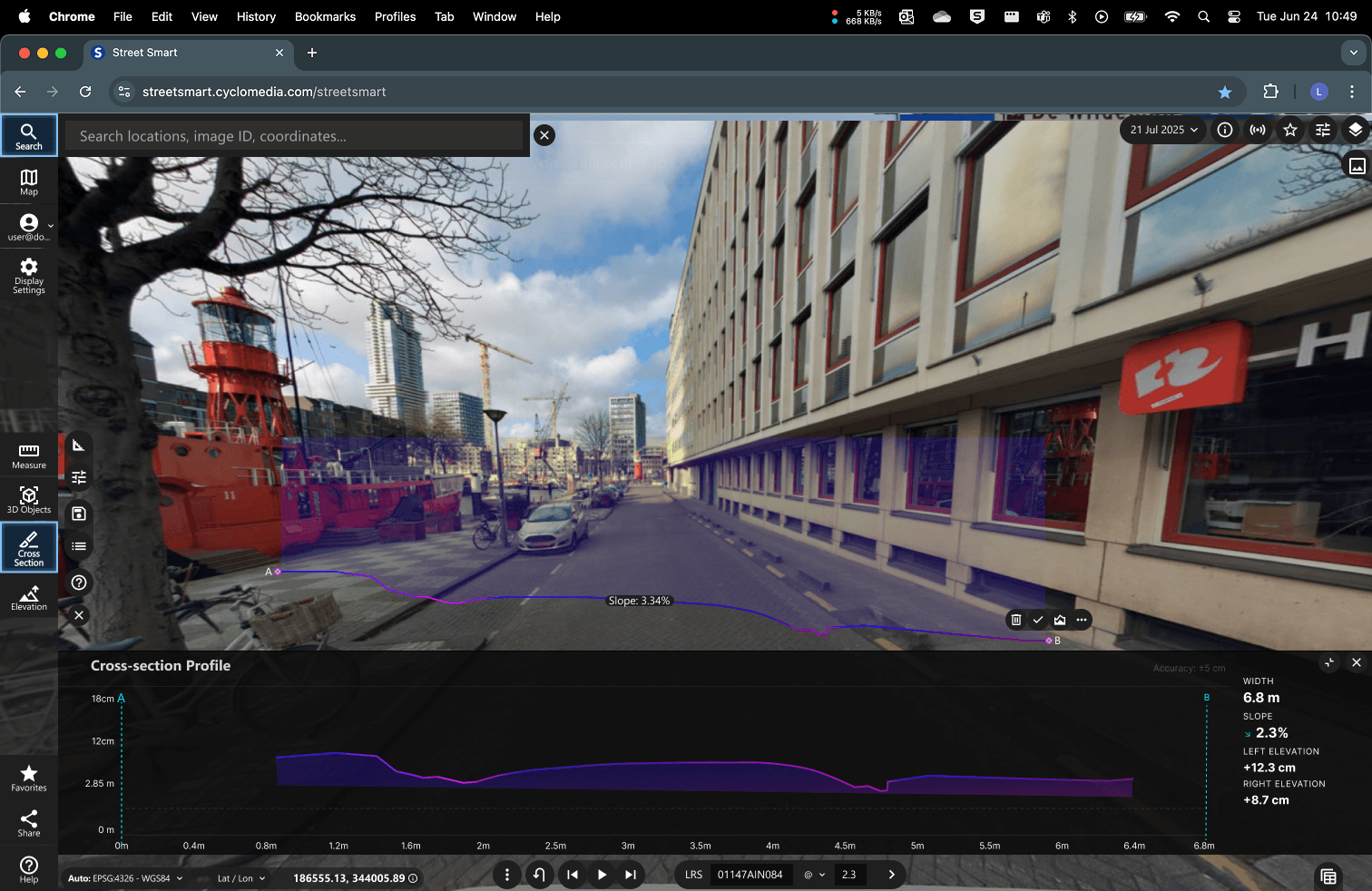
The Final redesigned Cross Section Tool.
Street Smart is Cyclomedia’s geospatial visualization platform, enabling users to inspect infrastructure using panoramic imagery and LiDAR data. In 2024, we began a full redesign—Street Smart X—to modernize the architecture and remove technical debt.
As part of this, I led the redesign of the Cross Section tool, simplifying complex workflows across multiple verticals into a clear, scalable experience, improving usability and data interpretation for tasks like slope analysis and road safety.
Key Design Decisions
Ditch the modes, simplify the interaction
Option A
Keep multiple modes, clean up the UI around them
Decision 01
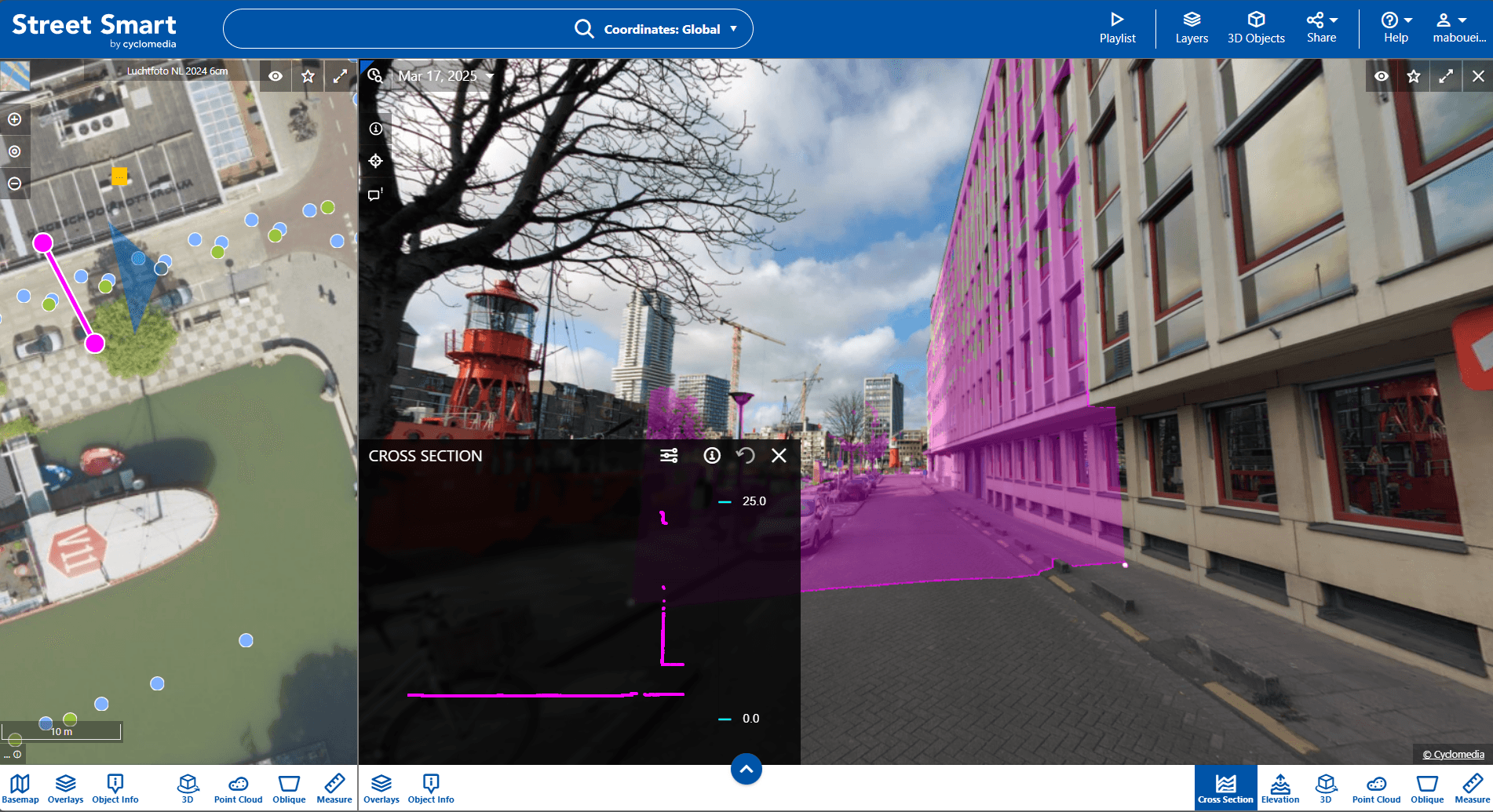
Users kept selecting the wrong mode before even starting a cross Section. The tool had multiple interaction modes — perpendicular, parallel — that made sense to engineers who built it, but not to the specialists who used it daily.
Chosen
Collapse into one guided, two-point interaction model
Result: One interaction, one mental model. Errors dropped, confidence went up, onboarding new users became significantly faster.
Show less, communicate more
Option A
Expose all available data for completeness
Decision 02
The profile view was technically complete, and completely overwhelming. Users stared at a wall of values trying to find the one number that mattered for their decision.
Chosen
Prioritise key metrics with a clear visual hierarchy
Result: Fewer numbers, clearer structure, better decisions. Users could read slope profiles at a glance instead of interpreting raw data.

Team: Product Design, PM, PO, Frontend team
Screenshot of the old UI.
Transforming a complex, error-prone feature into a clear, workflow-driven experience for engineers
Understanding the Problem
Real Workflows
Users rely on the tool for slope analysis, drainage, and safety checks, where accuracy and speed directly impact decisions
Key Frictions
Confusion around modes (especially perpendicular)
Hard-to-read profile with too much raw data
UI blocking the roadway view
No way to export or reuse results
Behavior Insight
Users needed actionable outputs, but the tool behaved like a viewer, not a decision-making tool.
↓ ~25%
Outcomes & Proof
drop-offs during interaction
More efficient
Task completion. Faster, clearer slope and profile analysis
Reduced
Task success & user confidence
↑ 20%
task success
Drop-offs and mis-clicks during interaction.
Success was measured through interaction-level metrics, tracking drop-offs, mis-clicks, and task completion using Amplitude, to evaluate usability, clarity, and user confidence.
Learnings
Defining workflows and jobs-to-be-done early helped align design decisions with real engineering needs under cross-functional constraints.
Simplifying complex interactions (like modes) had the biggest impact on usability and user trust.
In B2B tools, clarity and data readability matter more than feature richness, users prioritize accuracy and efficiency over flexibility.
What I’d Do Differently
Validate earlier with external DOT users to capture real-world variability beyond internal feedback.
Explore more advanced output formats (e.g., export types) to better fit downstream workflows.
Further refine how accuracy and system limitations (e.g., LiDAR constraints) are communicated to build trust.
Icon are from icons8.com & streamlinehq. Mix & Mach library from Lucian popovici.
Next case study
KPN— Flex & Boos